LatestBest Practices for Identifying and Securing Non-Human Identities
Resource / Online Journal
Phishing and Quishing on Campus: Human Risk and Technical Controls
Phishing and quishing on campus expose critical human‑risk gaps, requiring a blend of behavior‑driven awareness and identity‑centric defenses to protect students, staff, and sensitive data.
Published on May 21, 2026
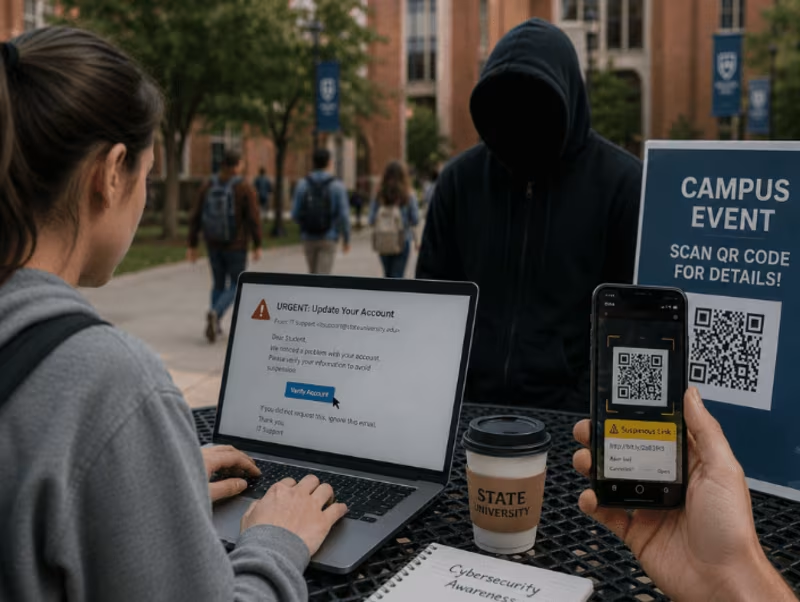
Higher‑education campuses are no longer closed, physical environments; they’re sprawling digital ecosystems where students, faculty, and staff constantly interact with emails, QR codes, and online portals. This openness makes campuses attractive targets for phishing and QR‑code phishing (quishing) attacks that exploit trust, urgency, and everyday convenience.
At the same time, managing human risk has become as important as hardening technical defenses, especially when attackers rely on social engineering against the human element. As an identity‑security partner, TechDemocracy helps campuses translate human‑risk‑management into concrete, identity‑centric controls that protect both people and data, without turning phishing attacks into a barrier to learning.
Why Human Risk Matters for Campus Cyber Threats
Human risk in campus settings is the likelihood that staff, faculty, or students will take actions that compromise security, such as clicking a suspicious link, scanning an unknown QR code, or sharing login credentials. In universities and colleges, work is highly collaborative, roles are fluid, and access is often shared, which amplifies the impact of human error or poor security decisions.
When combined with targeted phishing or quishing attacks, these behaviors can quickly lead to security incidents like data breaches, credential theft, and financial losses. That’s why human risk management (HRM) must be treated as a core part of the security posture, not just a one‑off training session.
The Human Factor Behind Phishing Success
Phishing emails succeed not because they are technically advanced, but because they manipulate human behavior, trust, and urgency. Attackers pose as IT support, HR, finance, or even faculty, using familiar language and realistic branding to get recipients to click on malicious links or open attachments.
Studies across university communities show that even technically savvy users often fall for well‑crafted phishing lures, underscoring the critical role of the human factor in compromise likelihood. Effective security awareness training must address this reality by teaching people how to recognize urgency‑based manipulation and verify channels before taking action.
Campus Threat Landscape: Phishing, Quishing, and Beyond
Common phishing vectors on campus include:
- Fake “urgent” emails from IT, HR, or finance around payroll, tuition, or fee deadlines.
- “Refund,” “grant,” or “award” messages that direct users to spoofed login pages.
- SMS‑based smishing attacks that mimic delivery, bank, or campus‑safety notices.
QR‑based phishing (quishing) has become a blind spot in many campus security programs. QR codes on posters, event flyers, menus, parking meters, or even printed handouts can silently redirect users to malicious websites that harvest login credentials or payment details. Because users cannot preview the destination before scanning, these attacks often bypass email filters and rely entirely on social engineering and trust in official‑looking materials.
Common Phishing and QR Code Techniques on Campus
Impersonation lures targeting HR and IT often mimic system‑maintenance messages, “account reset required” notices, or urgent policy updates. These emails guide recipients to spoofed portals that look almost identical to real identity or payment systems, increasing the chance of credential theft.
QR‑delivered attacks often appear in PDFs, event brochures, hostel notices, or tuition‑payment guides. More advanced actors use physical QR overlays on real posters or payment‑point QR codes or event‑specific flyers at orientations or conferences to blend in with normal campus life. Attackers can then redirect users to credential‑harvesting pages or fake payment gateways, easily stealing credit card information or university credentials.
Managing Human Risk on Campus
Human risk management (HRM) starts by treating users as risk profiles, not uniform blocks. Students, faculty, HR, finance, and IT each have different levels of access, data exposure, and susceptibility, so segmenting by role helps prioritize awareness and controls. Integrating HRM signals with identity‑access management (IAM) and privileged‑access management (PAM) logs allows security teams to flag risky user behaviors, such as repeated failed logins, suspicious QR scans, or repeated phishing‑simulation failures, and respond with targeted training or temporary access restrictions. This approach turns HRM into an operational, continuous assessment of the organization’s risk profile instead of a static policy.
Quantifying Risk and Driving Targeted Remediation
To move beyond guesswork, campuses need continuous monitoring of user actions across email, web, mobile, and SSO systems. Tagging risky events, scanning questionable QR codes, clicking on dubious links, or logging in from unfamiliar locations, enables risk scoring that classifies users into low, medium, and high‑risk categories. High‑risk users can then receive focused coaching, limited privileges, or stricter MFA requirements. Setting a periodic review cadence for risk thresholds and classification rules ensures that HRM adapts as threat actors evolve and new attack patterns emerge.
Human Risk Mitigation Focused on Behavior
Role‑specific security awareness training is far more effective than generic modules. HR and finance staff benefit from content on phishing‑resistant MFA and on avoiding credential sharing. At the same time, students need practical guidance on spotting fake payment or login pages that appear behind QR codes. Adding real-time training nudges, such as a short pop‑up explaining what went wrong when a user clicks a flagged link or scans a risky QR code, turns teachable moments into habit formation.
Running regular phishing and quishing simulations helps campuses measure real‑world susceptibility, track click‑rates, and refine messaging. When combined with least‑privilege access, this reduces the impact of any compromise because even if an account is breached, the attacker cannot easily move laterally through the environment.
Technical Controls: Email Security, MDM, and Identity Defenses
Strong email security should detect not only known‑bad links but also embedded images and QR‑like payloads that may host malicious URLs. For accounts with access to sensitive systems, phishing‑resistant MFA is essential to prevent credential‑reuse attacks.
For campus‑owned or BYOD environments, mobile device management (MDM) can enforce app‑install policies, OS updates, and secure‑browsing rules, blocking risky domains and apps that may follow QR‑based redirects. Web filters that block suspicious redirectors and known phishing domains further reduce the number of malicious websites that students or staff can reach from their devices.
QR Code Controls and Payment Security
Campuses can limit QR‑based data theft by banning unapproved third‑party payment QR codes on posters, forms, parking meters, and event materials. Official payment pages must use verified TLS‑secured domains and clearly display URLs or domains so users can recognize mismatches before scanning. Logging and alerting on QR‑originated transactions enable security teams to review unusual patterns or newly added payment methods quickly, helping to catch fraud before it escalates.
Identity Integration, Continuous Monitoring, and Incident Response
Linking phishing-risk signals into PAM and IGA systems helps security teams de-escalate or restrict highly privileged accounts when risky behavior is detected. CIAM telemetry for student accounts can surface anomalies like bulk logins, sudden device changes, or cross‑country logins, giving teams early warning of potential account compromise.
By instrumenting SIEM and mail‑gateway logs with QR‑scan and image‑analysis alerts, campuses can detect suspicious redirect patterns and build rules around conditional redirect URLs or non‑university domains. Regular tabletop exercises for QR‑ and email‑based incidents help teams refine incident response, credential‑revocation, and credit‑card‑fraud procedures in advance of a real breach.
Conclusion
Phishing and quishing thrive where security awareness, identity controls, and continuous monitoring are treated as separate initiatives. By integrating human risk management, IAM, and technical defenses, campuses can build a security‑conscious culture that protects sensitive information without sacrificing academic openness. If you want to measure and reduce human risk across your campus, TechDemocracy offers one of the best customizable services that help you build a tailored roadmap for resilience.
Recommended articles


How to Prevent Phishing Attacks
Take Your Identity Strategy
to the Next Level
Strengthen your organization's digital identity for a secure and worry-free tomorrow. Kickstart the journey with a complimentary consultation to explore personalized solutions.